

Mopeka Pro Check LPG Tank Level Sensor (Victron Compatible)
Orders placed before 8am (AEST/AEDT) on a business day are dispatched the same day. After 8am, or on a weekend, they are dispatched the next business day.
Accepts returns*
Couldn't load pickup availability
Guaranteed
Backed by us and the manufacturer.
Ferntree Gully showroom
Visit our 3,000 sqm showroom.
25+ years in caravanning
Local experts who know RVs.
Expert advice
Secure checkout
Pay safely, including Afterpay.
Delivery and Shipping
Delivery and Shipping
We ship Australia-wide using trusted carriers including Australia Post and Direct Freight Express.
Fast dispatch: Orders placed before 8am (AEST/AEDT) on a business day (Monday to Friday) are dispatched the same day. Orders placed after 8am, or on a weekend, are dispatched the next business day. Public holidays are not included in this timing.
Tracking Included: All parcels come with tracking for peace of mind.
Reliable Service: We choose carriers based on speed, reliability, and coverage.
Delivery Options: Standard and express options available at checkout.
For more details or specific delivery questions, feel free to contact our team.

Mopeka Pro Check LPG Tank Level Sensor (Victron Compatible)
Description
Description
Mopeka Pro Check Sensor LPG Tank Sensor
The PRO Sensor combines all the best technology of our ultrasonic sensing for the best sensor performance ever.
LPG Tanks: All steel LPG tanks up to 1000 gallons, horizontal or vertical cylinders.
Mounting: Mounts to bottom by magnets.
How to read level via Bluetooth: Free Mopeka Check APP on your smartphone or tablet; Or Mopeka Check LED Display.
Also compatible with Mopeka Wifi Bridge, allowing remote reading of sensor using APP.
Power: CR2032 Battery
**This package includes 1 Pro sensor only.**
Comes with spacers for 2, 3, 4 & 9Kg Bottles
Installing the Mopeka Pro Sensor
1. Go to your app store. Search for Mopeka Tank Check app and install..PNG)
2. Launch the app. When it starts it will automatically start a search for Mopeka sensors.
3. Press and hold SYNC button until sensor appears on app. (up to 10 seconds)
4. The sensor will then appear on your app as a new device.
5. Sensor is now Sync’d. You may now proceed to installing the sensor on the tank.
For Steel Tanks
6. Clean the bottom of the tank of any debris, excess paint, and rust.
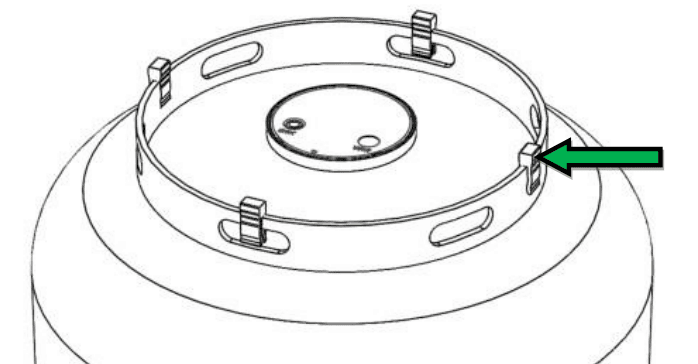
7. If your tank sits directly on the ground or other flat surface, then install the spacers to the bottom of the foot ring of your tank. This will provide adequate space and improved wireless range for the sensor.
8. The sensor mounts to the bottom center of the tank using magnets. The rubber pad between the magnets must make good contact with the tank, with no contaminants in between and must be aligned to the bottom center of the tank.
9. Apply a generous amount of the supplied sonic grease directly to the rubber pad before attaching sensor to the tank.
10. Install sensor on tank such that rubber pad is aligned with the bottom, center of tank.
Payment & Security
Payment methods
Your payment information is processed securely. We do not store credit card details nor have access to your credit card information.
